> ## Documentation Index
> Fetch the complete documentation index at: https://core-builds.mintlify.site/llms.txt
> Use this file to discover all available pages before exploring further.
# Formatter Gallery
> Visual previews and import links for all 16 Core Builds stream formatters.
Formatters control how every stream card looks in Stremio and WuPlay — the title line, metadata rows, cache badge, audio tags, and release group. You can swap them any time without changing your template.
## How to Import a Formatter
1. Copy the raw JSON URL for your chosen formatter from this page.
2. Open your AIOStreams dashboard.
3. Go to the **Formatter** section and click the **Import** icon (download arrow).
4. Paste the URL and click **Load**.
5. Click **Save** — then reinstall the AIOStreams manifest in Stremio.
Formatters are applied through the **Formatter tab** in AIOStreams, not through the Load Template flow. No Stremio reinstall is needed after switching a formatter.
***
## Quick Comparison
| Formatter | Style | Best for | Bundled? |
| ------------------------ | --------------- | --------------------------------- | -------- |
| Core Nexus Apex v2 ⭐ | Emoji circles | Most setups — recommended | No |
| Core Nexus Elite | Emoji circles | Default out of the box | **Yes** |
| Core Nexus Sigma | `「 」` brackets | Clean typographic feel | No |
| Core Nexus Minimal | ⚡/⏳ indicator | Apple TV, small screens, TV UI | No |
| Core Nexus TV | UPPER CASE | Smart TVs, projectors, 10-foot UI | No |
| Core Nexus Apex | Emoji circles | Audio codec detail | No |
| Core Syntax | `「 」` brackets | Original style | No |
| Core Syntax V3 | `「 」` brackets | JBL Spatial, IMAX flags | No |
| Omni Diamond v2.2.0 | Dense emoji | Maximum metadata density | No |
| Core Zenith Diamond | 🔹/🔸 dots | Dot separator style | No |
| Core Zenith Auburn Tiger | 🔸 orange dots | Warm colour scheme | No |
| Midnight Slate | ASCII `◼⬤▶◆` | No-emoji clients | No |
| Nexus Prime | Emoji | SeaDex detection, age format | No |
| Core Nexus Uniform | Emoji circles | Legacy | No |
| RB3 Clean v4 | Bold unicode | Three-line name | No |
| RB3 Formatter | 🔸/🔹 smallcaps | Auburn Tiger pairing | No |
***
## Active / Recommended Formatters
### Core Nexus Apex v2 ⭐ Recommended
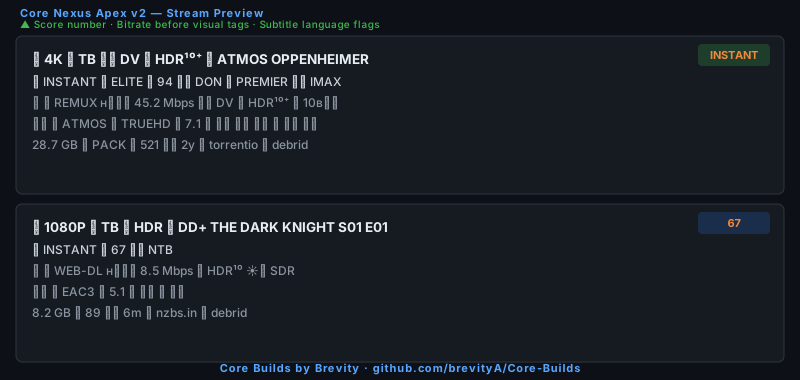
The recommended upgrade over Apex v1. Three targeted improvements over Elite: a score number in line 1 (💎 ELITE ✦ 94 instead of a label only), bitrate before visual tags in line 2 so the most decision-relevant spec comes first, and per-language subtitle flags (📝 🇬🇧 🇫🇷) replacing the binary SUB badge. Best all-round pick for 4K Apex users.
 Import Formatter
***
### Core Nexus Elite (Bundled in all templates)
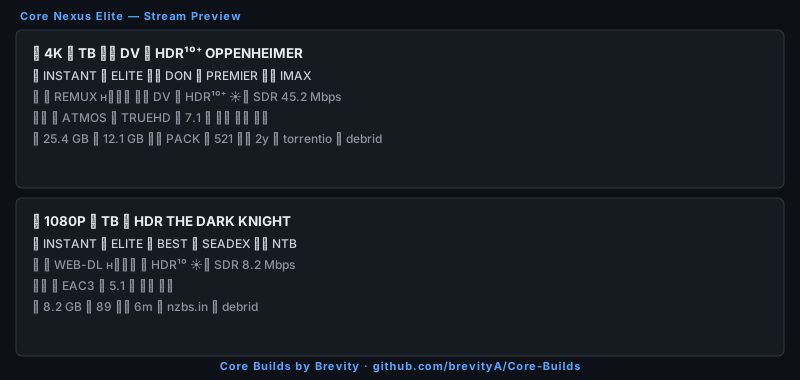
High-contrast and immediately legible. Colour-coded resolution circles (🟣 4K · 🔵 1080P · 🟢 720P · ⚫ 480P), HDR/DV in the name line, INSTANT/UNCACHED cache badge, and PREMIER release group detection. Ships pre-loaded in every Core Builds template — nothing to do on a fresh import.
Import Formatter
***
### Core Nexus Elite (Bundled in all templates)
High-contrast and immediately legible. Colour-coded resolution circles (🟣 4K · 🔵 1080P · 🟢 720P · ⚫ 480P), HDR/DV in the name line, INSTANT/UNCACHED cache badge, and PREMIER release group detection. Ships pre-loaded in every Core Builds template — nothing to do on a fresh import.
 Import Formatter
***
### Core Nexus Sigma
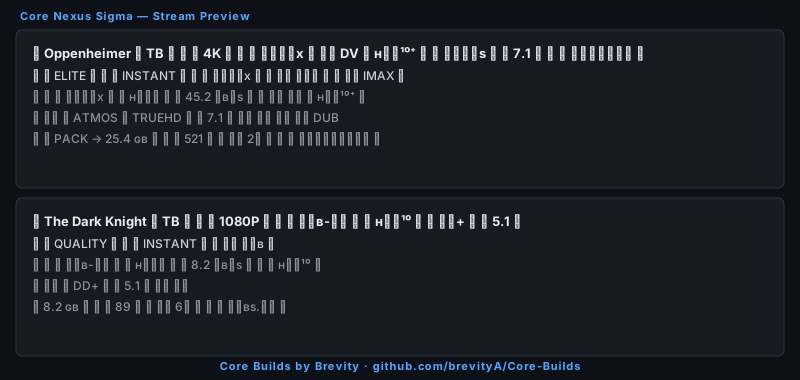
Typographic `「 」` / `『 』` bracket system. Title-first name line, smallcaps throughout — a premium editorial feel for users who prefer clean typography over emoji-heavy layouts.
Import Formatter
***
### Core Nexus Sigma
Typographic `「 」` / `『 』` bracket system. Title-first name line, smallcaps throughout — a premium editorial feel for users who prefer clean typography over emoji-heavy layouts.
 Import Formatter
***
### Core Nexus Minimal
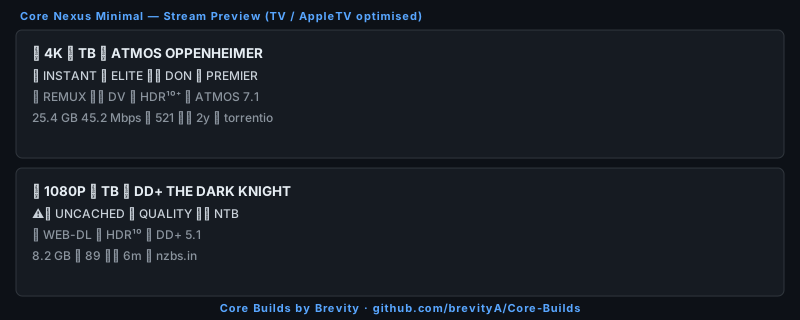
3-line description, ⚡/⏳ cache indicator in the name, first audio codec only. Built for TV, Apple TV, and small screens where horizontal space is limited. The most compact layout in the official set.
Import Formatter
***
### Core Nexus Minimal
3-line description, ⚡/⏳ cache indicator in the name, first audio codec only. Built for TV, Apple TV, and small screens where horizontal space is limited. The most compact layout in the official set.
 Import Formatter
***
### Core Nexus TV
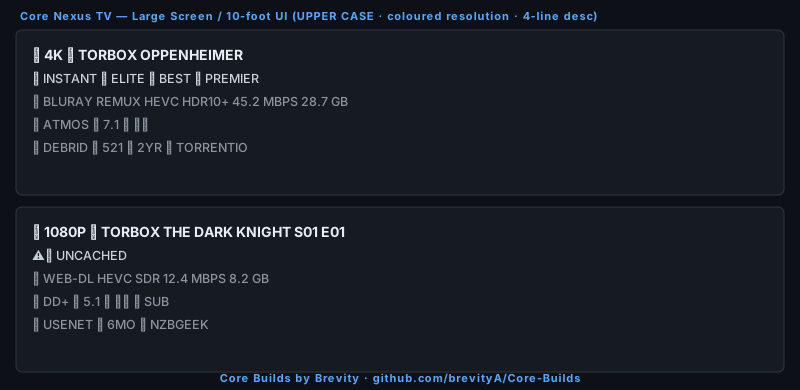
10-foot UI optimised. UPPER CASE throughout — readable across the room without smallcaps — with coloured resolution circles (🔴 4K · 🔵 1080P · 🟢 720P), a 4-line description with clear section icons (🎬 video · 🔊 audio · 🔌 type/meta). Designed for projectors, smart TVs, and any setup where the screen is across the room.
Import Formatter
***
### Core Nexus TV
10-foot UI optimised. UPPER CASE throughout — readable across the room without smallcaps — with coloured resolution circles (🔴 4K · 🔵 1080P · 🟢 720P), a 4-line description with clear section icons (🎬 video · 🔊 audio · 🔌 type/meta). Designed for projectors, smart TVs, and any setup where the screen is across the room.
 Import Formatter
***
### Core Nexus Apex
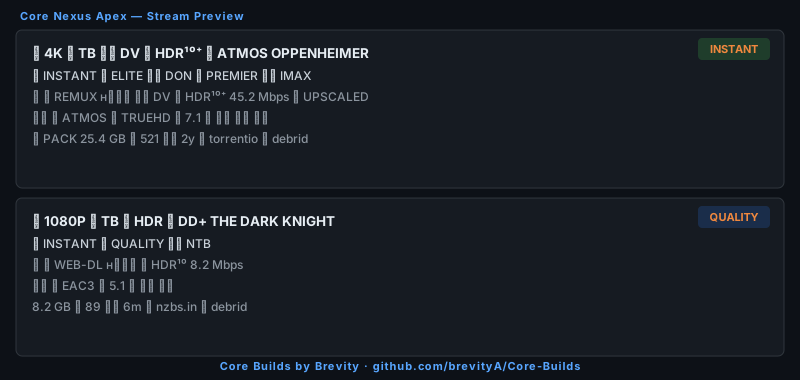
Evolution of Elite. Adds audio codec to the name line, a two-tier score badge (💎 ELITE ≥75 · ✦ QUALITY ≥50), and a season pack flag before the file size. Apex v2 is the current recommended variant for most users.
Import Formatter
***
### Core Nexus Apex
Evolution of Elite. Adds audio codec to the name line, a two-tier score badge (💎 ELITE ≥75 · ✦ QUALITY ≥50), and a season pack flag before the file size. Apex v2 is the current recommended variant for most users.
 Import Formatter
***
### Core Syntax
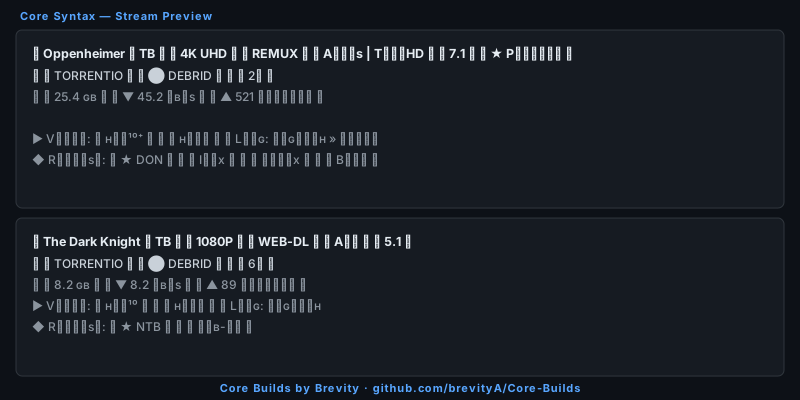
The original Core Builds formatter. `✦`/`✧` cache indicator in the name, `「 」` bracket metadata system, ◈ ELITE score badge, full release group and edition tagging. The foundation that later formatters were built on.
Import Formatter
***
### Core Syntax
The original Core Builds formatter. `✦`/`✧` cache indicator in the name, `「 」` bracket metadata system, ◈ ELITE score badge, full release group and edition tagging. The foundation that later formatters were built on.
 Import Formatter
***
### Core Syntax V3
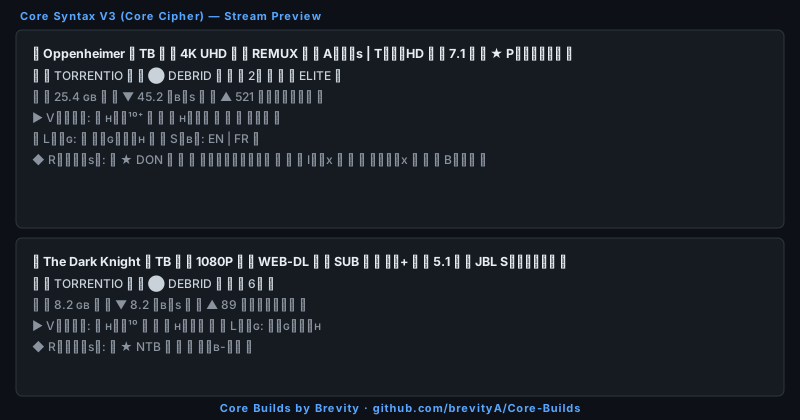
Personal build variant with extra features: JBL Spatial audio detection (`🔊 JBL Sᴘᴀᴛɪᴀʟ` when DD+/EAC3 is present), ★ Premium release group badge, IMAX/Hybrid/edition flags, and indexer in the release line.
Import Formatter
***
### Core Syntax V3
Personal build variant with extra features: JBL Spatial audio detection (`🔊 JBL Sᴘᴀᴛɪᴀʟ` when DD+/EAC3 is present), ★ Premium release group badge, IMAX/Hybrid/edition flags, and indexer in the release line.
 Import Formatter
***
### Omni Diamond v2.2.0
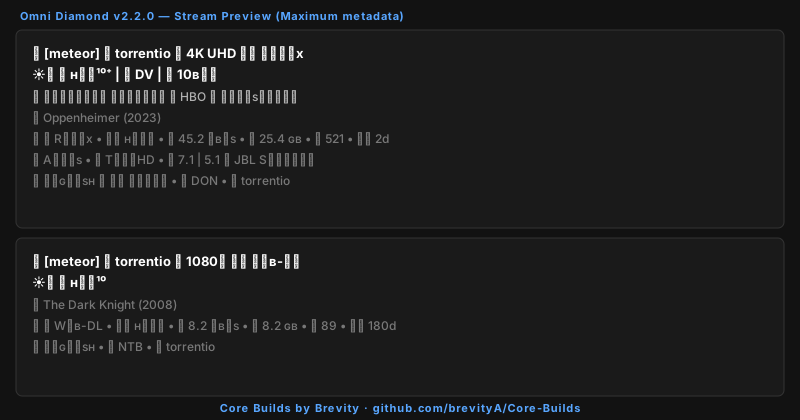
Maximum metadata density. Two-line name (visual tags on a second line), edition/network/remastered flags, JBL Spatial detection, full language + release group + indexer in the description. Best for users who want to see everything at a glance without opening a stream.
Import Formatter
***
### Omni Diamond v2.2.0
Maximum metadata density. Two-line name (visual tags on a second line), edition/network/remastered flags, JBL Spatial detection, full language + release group + indexer in the description. Best for users who want to see everything at a glance without opening a stream.
 Import Formatter
***
### Core Zenith Diamond
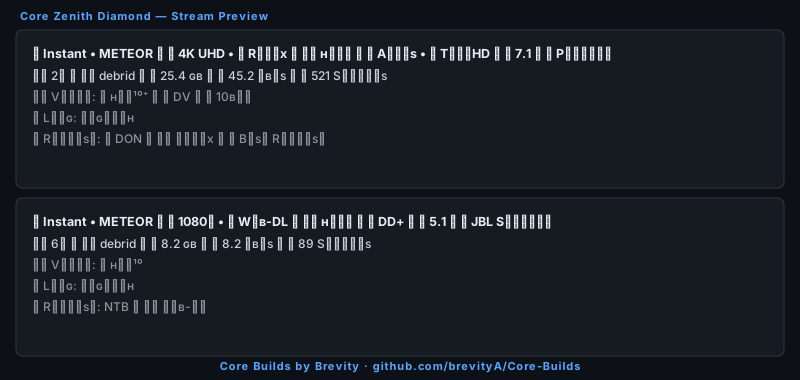
🔹/🔸 dot separator style throughout. Info-dense name line with encode, audio, channels, and PREMIER flag. 4-line description with bitrate, seeders, video quality, language, and release group.
Import Formatter
***
### Core Zenith Diamond
🔹/🔸 dot separator style throughout. Info-dense name line with encode, audio, channels, and PREMIER flag. 4-line description with bitrate, seeders, video quality, language, and release group.
 Import Formatter
***
### Core Zenith Auburn Tiger
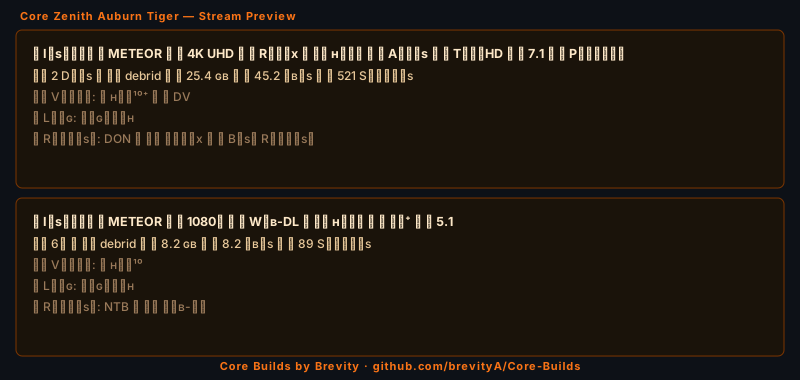
Auburn Tiger edition of Core Zenith Diamond. Orange 🟠 4K badge, 🐅 release line prefix, amber card palette — a distinct warm aesthetic designed to pair with the Auburn Tiger template.
Import Formatter
***
### Core Zenith Auburn Tiger
Auburn Tiger edition of Core Zenith Diamond. Orange 🟠 4K badge, 🐅 release line prefix, amber card palette — a distinct warm aesthetic designed to pair with the Auburn Tiger template.
 Import Formatter
***
### Midnight Slate
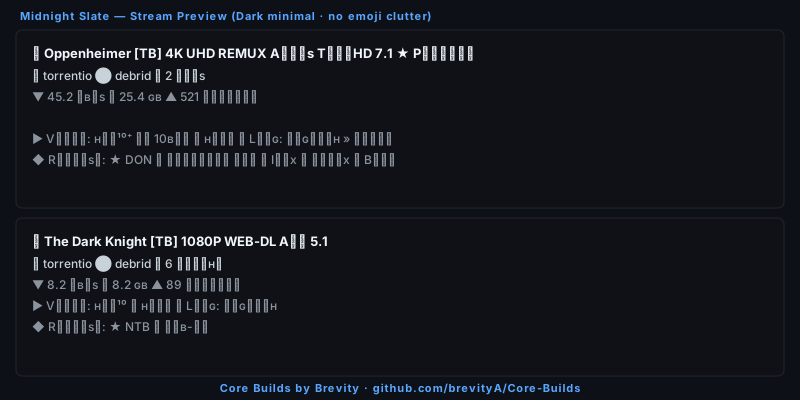
Dark minimal. `◼`/`⬤`/`▶`/`◆` ASCII symbols instead of emoji — clean typographic lines for clients that render emoji poorly, or for users who prefer a no-clutter look.
Import Formatter
***
### Midnight Slate
Dark minimal. `◼`/`⬤`/`▶`/`◆` ASCII symbols instead of emoji — clean typographic lines for clients that render emoji poorly, or for users who prefer a no-clutter look.
 Import Formatter
***
### Nexus Prime
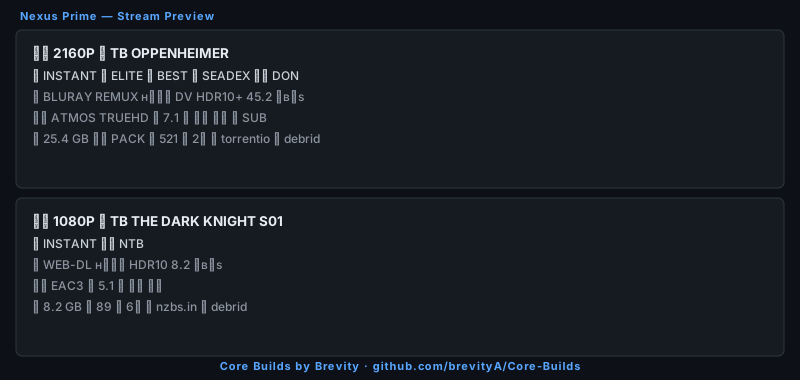
An early Core Builds formatter. Similar layout to Uniform with additional metadata: SeaDex/BEST detection, 📅 age format, per-language subtitle emoji track listing, and folder size support.
Import Formatter
***
### Nexus Prime
An early Core Builds formatter. Similar layout to Uniform with additional metadata: SeaDex/BEST detection, 📅 age format, per-language subtitle emoji track listing, and folder size support.
 Import Formatter
***
### Core Nexus Uniform (Legacy)
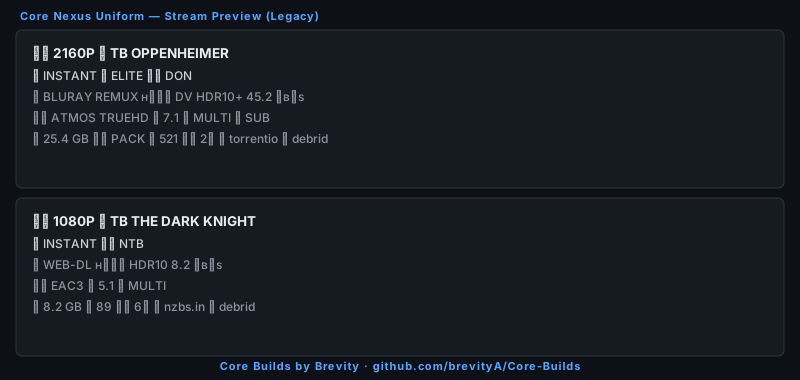
The predecessor to Core Nexus Elite. Kept for users who prefer the older layout. For new setups, Elite or Apex v2 are the recommended replacements.
Import Formatter
***
### Core Nexus Uniform (Legacy)
The predecessor to Core Nexus Elite. Kept for users who prefer the older layout. For new setups, Elite or Apex v2 are the recommended replacements.
 Import Formatter
***
## Community Formatters
### RB3 Clean v4
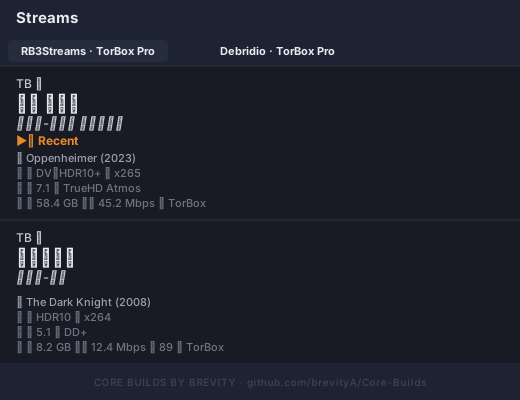
Service-first layout by **RB3**. Three name lines — service + ⚡/⏳ cache status · bold unicode resolution (`𝟰𝗞 𝗨𝗛𝗗` · `𝟭𝟬𝟴𝟬𝗽`) · italic unicode quality source (`𝘉𝘭𝘶-𝘳𝘢𝘺 𝘙𝘦𝘮𝘶𝘹` · `𝘞𝘌𝘉-𝘋𝘓`). Up to 6 structured `⁞`-separated description rows — the highest raw metadata density of any formatter in the collection.
Import Formatter
***
## Community Formatters
### RB3 Clean v4
Service-first layout by **RB3**. Three name lines — service + ⚡/⏳ cache status · bold unicode resolution (`𝟰𝗞 𝗨𝗛𝗗` · `𝟭𝟬𝟴𝟬𝗽`) · italic unicode quality source (`𝘉𝘭𝘶-𝘳𝘢𝘺 𝘙𝘦𝘮𝘶𝘹` · `𝘞𝘌𝘉-𝘋𝘓`). Up to 6 structured `⁞`-separated description rows — the highest raw metadata density of any formatter in the collection.
 Import Formatter
***
### RB3 Formatter
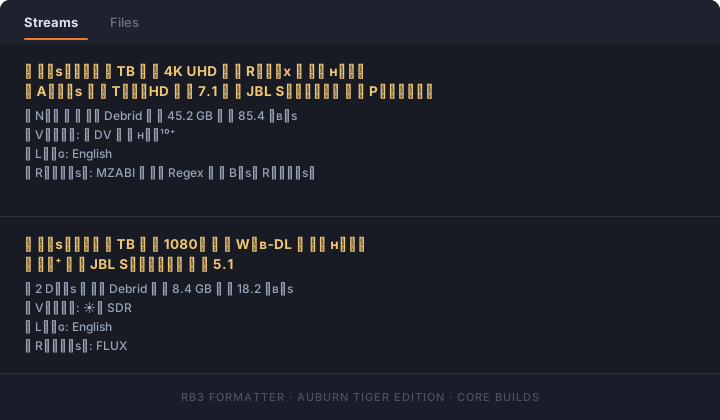
Original RB3 community formatter. Pairs with the Auburn Tiger template — orange/navy resolution badges, JBL Spatial audio detection, and PREMIER release group tagging. The 🔸/🔹 smallcaps style makes it a natural companion to the Auburn Tiger colour scheme.
Import Formatter
***
### RB3 Formatter
Original RB3 community formatter. Pairs with the Auburn Tiger template — orange/navy resolution badges, JBL Spatial audio detection, and PREMIER release group tagging. The 🔸/🔹 smallcaps style makes it a natural companion to the Auburn Tiger colour scheme.
 Import Formatter
***
## Notes
* Formatters are display-only — they do not affect which streams appear, filtering, or sort order.
* All Core Builds formatters use `id: "tamtaro"` with `definitions.overrides.tamtaro` — this is the correct structure for AIOStreams.
* Score badges (ELITE / QUALITY) only appear when a stream has a ranked regex or stream expression score.
* `{tools.newLine}` must be used for line breaks in the description — literal newlines cause the formatter to be silently discarded on import.
* Compatible with AIOStreams v2.4.6+.
Import Formatter
***
## Notes
* Formatters are display-only — they do not affect which streams appear, filtering, or sort order.
* All Core Builds formatters use `id: "tamtaro"` with `definitions.overrides.tamtaro` — this is the correct structure for AIOStreams.
* Score badges (ELITE / QUALITY) only appear when a stream has a ranked regex or stream expression score.
* `{tools.newLine}` must be used for line breaks in the description — literal newlines cause the formatter to be silently discarded on import.
* Compatible with AIOStreams v2.4.6+.