> ## Documentation Index
> Fetch the complete documentation index at: https://core-builds.mintlify.site/llms.txt
> Use this file to discover all available pages before exploring further.
# WuPlay Setup
> Use Core Builds with WuPlay — a Stremio-compatible streaming client for Android TV, Chromecast, and more.
 ## What is WuPlay?
[WuPlay](https://wuplay.app) is a Stremio-compatible streaming client that works with all Stremio add-ons — including AIOStreams and Core Builds. Available on Android TV, Google TV, and Fire Stick. Supports Chromecast casting, Trakt integration, and configurable layouts.
**Current version:** v0.7.3-beta
**Use WuPlay when:**
* You want a dedicated streaming app on Android TV / Fire Stick / Chromecast
* You prefer a different UI from Stremio with built-in genre browsing and binge groups
* You need Chromecast casting support
## Quick Import
Already have a TorBox account and a configured AIOStreams template? Four steps:
Open your AIOStreams instance → your manifest URL is shown at the top of the config page. Copy it.
In WuPlay, go to **Settings → Configuration**. Your **Profile Key** is displayed at the top (e.g. `a1b2c3`). Note it down.
Scan the **QR code** on the Configuration screen to open the configurator pre-linked to your device — or go to [config.wuplay.app/configure](https://config.wuplay.app/configure/) manually and enter your Profile Key.
In the configurator under **Add-ons**, paste your AIOStreams manifest URL and save. The add-on syncs to your WuPlay app automatically.
***
## Full Beginner Walkthrough
### 1. Install WuPlay
Download WuPlay using **downloader code `5781040`** on your device, or get it from:
* **Android TV / Google TV / Fire Stick** → sideload via [WuPlay releases](https://github.com/wuplayapp/wuplay-releases)
### 2. Get a TorBox subscription
Sign up at [torbox.app](https://torbox.app/subscription?referral=d1ccddb0-f094-45ca-b52b-942a2635855e). You need at least a **Standard** plan. Go to **Dashboard → API Keys** and copy your API key.
### 3. Choose and import a template
1. Go to the [Template Directory](/template-directory)
2. Click **Import on ElfHosted** or **Import on Fortheweak** next to your chosen template
3. AIOStreams opens with the template pre-loaded
Not sure which template? See [Which Template?](/which-template). For most people: **4K Apex** (4K) or **Stream** (1080p).
### 4. Configure AIOStreams
In AIOStreams:
1. Go to **Services** → toggle **TorBox** ON → paste your API key
2. *(Optional)* Add a TMDB Access Token from [themoviedb.org/settings/api](https://www.themoviedb.org/settings/api)
3. Click **Save**
### 5. Copy your manifest URL
After saving, AIOStreams shows your **manifest URL**. Copy it. It looks like:
```
https://aiostreams.elfhosted.com/stremio/abcdef1234/manifest.json
```
### 6. Find your WuPlay Profile Key
Open WuPlay on your device and go to **Settings → Configuration**. Your **Profile Key** is shown at the top of the screen. A **QR code** is also displayed — scan it with your phone to open the WuPlay configurator directly, pre-linked to your device.
## What is WuPlay?
[WuPlay](https://wuplay.app) is a Stremio-compatible streaming client that works with all Stremio add-ons — including AIOStreams and Core Builds. Available on Android TV, Google TV, and Fire Stick. Supports Chromecast casting, Trakt integration, and configurable layouts.
**Current version:** v0.7.3-beta
**Use WuPlay when:**
* You want a dedicated streaming app on Android TV / Fire Stick / Chromecast
* You prefer a different UI from Stremio with built-in genre browsing and binge groups
* You need Chromecast casting support
## Quick Import
Already have a TorBox account and a configured AIOStreams template? Four steps:
Open your AIOStreams instance → your manifest URL is shown at the top of the config page. Copy it.
In WuPlay, go to **Settings → Configuration**. Your **Profile Key** is displayed at the top (e.g. `a1b2c3`). Note it down.
Scan the **QR code** on the Configuration screen to open the configurator pre-linked to your device — or go to [config.wuplay.app/configure](https://config.wuplay.app/configure/) manually and enter your Profile Key.
In the configurator under **Add-ons**, paste your AIOStreams manifest URL and save. The add-on syncs to your WuPlay app automatically.
***
## Full Beginner Walkthrough
### 1. Install WuPlay
Download WuPlay using **downloader code `5781040`** on your device, or get it from:
* **Android TV / Google TV / Fire Stick** → sideload via [WuPlay releases](https://github.com/wuplayapp/wuplay-releases)
### 2. Get a TorBox subscription
Sign up at [torbox.app](https://torbox.app/subscription?referral=d1ccddb0-f094-45ca-b52b-942a2635855e). You need at least a **Standard** plan. Go to **Dashboard → API Keys** and copy your API key.
### 3. Choose and import a template
1. Go to the [Template Directory](/template-directory)
2. Click **Import on ElfHosted** or **Import on Fortheweak** next to your chosen template
3. AIOStreams opens with the template pre-loaded
Not sure which template? See [Which Template?](/which-template). For most people: **4K Apex** (4K) or **Stream** (1080p).
### 4. Configure AIOStreams
In AIOStreams:
1. Go to **Services** → toggle **TorBox** ON → paste your API key
2. *(Optional)* Add a TMDB Access Token from [themoviedb.org/settings/api](https://www.themoviedb.org/settings/api)
3. Click **Save**
### 5. Copy your manifest URL
After saving, AIOStreams shows your **manifest URL**. Copy it. It looks like:
```
https://aiostreams.elfhosted.com/stremio/abcdef1234/manifest.json
```
### 6. Find your WuPlay Profile Key
Open WuPlay on your device and go to **Settings → Configuration**. Your **Profile Key** is shown at the top of the screen. A **QR code** is also displayed — scan it with your phone to open the WuPlay configurator directly, pre-linked to your device.
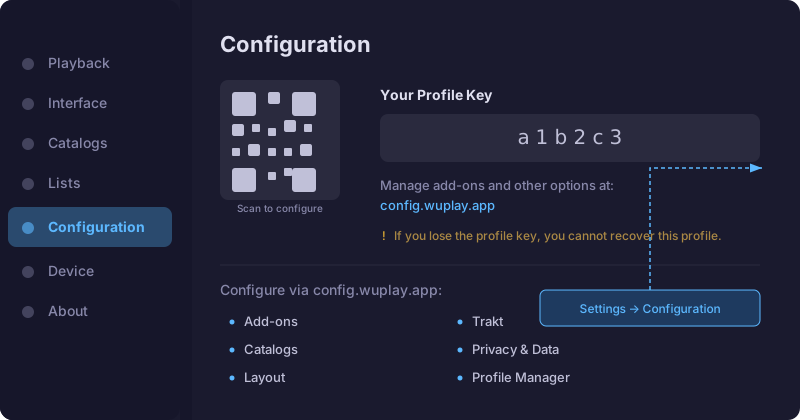 If you lose your Profile Key, you cannot recover your profile. Save it somewhere safe.
### 7. Add the add-on via WuPlay configurator
1. **Scan the QR code** shown on the Configuration screen to open the configurator pre-linked to your device — or go to [config.wuplay.app/configure](https://config.wuplay.app/configure/) manually and enter your **Profile Key**
2. Navigate to **Add-ons**
3. Paste your AIOStreams manifest URL
4. Save — the add-on syncs to your WuPlay app automatically
### 8. Start streaming
Go back to WuPlay on your device. Browse movies and shows → select a title → pick a stream. The Core Builds formatter shows resolution, codec, audio, and file size for each stream. To cast, use the Chromecast icon in the player controls.
WuPlay uses the same manifest URL as Stremio and Nuvio — you can use all three clients with the same AIOStreams config. Changes you make in AIOStreams apply to all of them.
***
## WuPlay vs Stremio
| | WuPlay | Stremio |
| -------------- | --------------------------------------------------------------------------- | ---------------------------------------- |
| Platform | Android TV, Fire Stick, Chromecast | Desktop + mobile apps |
| Configuration | Via [config.wuplay.app](https://config.wuplay.app/configure/) + Profile Key | In-app settings |
| Chromecast | Built-in cast support | Not natively supported |
| Genre browsing | Built-in genres screen (reality, anime, etc.) | Add-on dependent |
| Trakt | Built-in integration | Via add-on |
| Binge mode | Binge groups with auto-play | Manual next episode |
| Best for | TV devices, casting, lean-back viewing | Desktop, mobile, full library management |
## WuPlay Links
* **GitHub releases** → [github.com/wuplayapp/wuplay-releases](https://github.com/wuplayapp/wuplay-releases)
* **Downloader code** → `5781040`
* **Discord** → [discord.gg/PvZjHVGtE9](https://discord.gg/PvZjHVGtE9)
* **Ko-fi** → [ko-fi.com/wuplaydev](https://ko-fi.com/wuplaydev)
## Troubleshooting
* **No streams appearing** → Make sure your manifest URL is correct and your TorBox API key is active in AIOStreams
* **Add-on not syncing** → Verify your Profile Key is correct in the configurator at [config.wuplay.app](https://config.wuplay.app/configure/)
* **Cast not working** → Ensure your Chromecast and WuPlay device are on the same Wi-Fi network
* **Streams buffer or stall** → Try a [Speed](/template-directory#speed-torbox) or [Flash](/template-directory#flash) template for faster cached results
* **FLAC audio issues** → WuPlay v0.7.3+ automatically transcodes FLAC tracks (ExoPlayer limitation)
* **"No compatible streams" on resume** → Fixed in v0.7.3 — update WuPlay if you see this
More help: [Troubleshooting](/troubleshooting) · [FAQ](/faq) · [WuPlay Discord](https://discord.gg/PvZjHVGtE9)
If you lose your Profile Key, you cannot recover your profile. Save it somewhere safe.
### 7. Add the add-on via WuPlay configurator
1. **Scan the QR code** shown on the Configuration screen to open the configurator pre-linked to your device — or go to [config.wuplay.app/configure](https://config.wuplay.app/configure/) manually and enter your **Profile Key**
2. Navigate to **Add-ons**
3. Paste your AIOStreams manifest URL
4. Save — the add-on syncs to your WuPlay app automatically
### 8. Start streaming
Go back to WuPlay on your device. Browse movies and shows → select a title → pick a stream. The Core Builds formatter shows resolution, codec, audio, and file size for each stream. To cast, use the Chromecast icon in the player controls.
WuPlay uses the same manifest URL as Stremio and Nuvio — you can use all three clients with the same AIOStreams config. Changes you make in AIOStreams apply to all of them.
***
## WuPlay vs Stremio
| | WuPlay | Stremio |
| -------------- | --------------------------------------------------------------------------- | ---------------------------------------- |
| Platform | Android TV, Fire Stick, Chromecast | Desktop + mobile apps |
| Configuration | Via [config.wuplay.app](https://config.wuplay.app/configure/) + Profile Key | In-app settings |
| Chromecast | Built-in cast support | Not natively supported |
| Genre browsing | Built-in genres screen (reality, anime, etc.) | Add-on dependent |
| Trakt | Built-in integration | Via add-on |
| Binge mode | Binge groups with auto-play | Manual next episode |
| Best for | TV devices, casting, lean-back viewing | Desktop, mobile, full library management |
## WuPlay Links
* **GitHub releases** → [github.com/wuplayapp/wuplay-releases](https://github.com/wuplayapp/wuplay-releases)
* **Downloader code** → `5781040`
* **Discord** → [discord.gg/PvZjHVGtE9](https://discord.gg/PvZjHVGtE9)
* **Ko-fi** → [ko-fi.com/wuplaydev](https://ko-fi.com/wuplaydev)
## Troubleshooting
* **No streams appearing** → Make sure your manifest URL is correct and your TorBox API key is active in AIOStreams
* **Add-on not syncing** → Verify your Profile Key is correct in the configurator at [config.wuplay.app](https://config.wuplay.app/configure/)
* **Cast not working** → Ensure your Chromecast and WuPlay device are on the same Wi-Fi network
* **Streams buffer or stall** → Try a [Speed](/template-directory#speed-torbox) or [Flash](/template-directory#flash) template for faster cached results
* **FLAC audio issues** → WuPlay v0.7.3+ automatically transcodes FLAC tracks (ExoPlayer limitation)
* **"No compatible streams" on resume** → Fixed in v0.7.3 — update WuPlay if you see this
More help: [Troubleshooting](/troubleshooting) · [FAQ](/faq) · [WuPlay Discord](https://discord.gg/PvZjHVGtE9)